Showing posts with label transaction. Show all posts

November 6, 2015

Find User-Exits and BAdIs in ABAP. Part 4

In the last post I showed a very simple but practical example about implementing a BAdI. This time I'll show how to implement a classical user-exit. As I wrote before, a BAdI is also a user-exit but in an object oriented version .

Also it's a matter of investigation and you must study all the possibilities when looking for a solution to your business requirement. Some stuff can't be definitely be done however there's at least a standard way to implement it.

For example, once I had this requirement where I needed that a replenishment transaction could divide all the generated purchase requests by the purchasing group. By standard this is not possible so it was necessary to create a program. Being SAP a complete ERP with the best practices in the business it's better to follow its instructions rather than re-inventing the wheel.

As we did in the previous post we must look for the user-exits in the transaction we are trying to enhance. When we have it we must use the transaction 'CMOD'. This transaction works creating projects where we group all the user-exits.

Before we use 'CMOD' we can check transaction 'SMOD', which is used to look for details of the user-exit like parameters and documentation if available.This same information can be watched in transaction 'CMOD', however, you must create the project first.

In this example we are going to implement a simple user-exit for transaction 'VKP1' (Change price calculation). The name of the user-exit is 'LWVK1003', which you can find with a program I posted before.

Let's implement it:

1. Execute transaction 'CMOD'.

2. Name the project 'ZMYENH'.

3. Click on button 'Create'.

4. Type a brief description of the project.

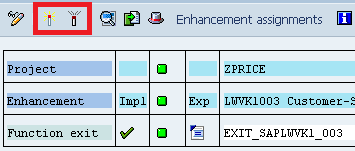
5. Click the button 'Enhancement assignments'. At this stage you'll be requested to create a transport request before saving.

6. Type in the textbox 'Enhancement' the user-exit name 'LWVK1003'.

7. In the same screen click the button 'Components'.

8. A screen with the user-exits is going to be shown. There you will see your enhancement. Double click on it.

9. Now a function module with the name 'EXIT_SAPLWVK1_003' is shown in the screen with the following code:

 1
 2
 3
 4
 5
 6
 7
 8
 9
10
11
12
13
14
15
16
17
function exit_saplwvk1_003 .
*"----------------------------------------------------------------------
*"*"Lokale Schnittstelle:
*"  IMPORTING
*"     VALUE(PI_KALP_UPDKZ) LIKE  KALP-UPDKZ
*"     VALUE(PI_I_KALP) LIKE  KALP STRUCTURE  KALP
*"     VALUE(PI_I_VORGA) LIKE  PISVR-VORGA OPTIONAL
*"     REFERENCE(PI_I_GLOB) TYPE  GLOB OPTIONAL
*"  EXPORTING
*"     VALUE(PE_I_ERRO) LIKE  ERRO_TEMP STRUCTURE  ERRO_TEMP
*"----------------------------------------------------------------------


include zxvkpu04 .


endfunction.

10. Double click on the word 'zxvkpu04'.

11. Copy and paste the following code:

 1
 2
 3
 4
 5
 6
 7
 8
 9
10
11
12
13
14
15
16
17
  case pi_kalp_updkz.

*-- Insert of a pricing position --------------------------------------*
    when 'I'.

*-- Update of a pricing position --------------------------------------*
    when 'U'.
*---- Sales price is less than net-net-purchase price -----------------*
      if pi_i_kalp-vkpne lt pi_i_kalp-ekpnn.
        pe_i_erro-msgid = 'WV'.                      "Message class WV
*       PE_I_ERRO-MSGTY = 'E'.                       "Error
        pe_i_erro-msgty = 'W'.                       "Warning
        pe_i_erro-msgno = '463'.                     "Message no 463
        exit.
      endif.

  endcase.

12. Activate the code.

13. Return to function module with 'F3'.

14. Return to the project.

15. Activate the project and exit of transaction 'CMOD'.
16. Execute transaction 'VKP1' and test it with any material. 


When I execute transaction 'VKP1' and the sales price is less than net purchase price the system responds with a warning.


You can debug placing a break-point in your code and check the execution.


Finally I would like to add that in a project you can add as many user-exits as you may want. Just try to group them according to you business module and areas.

See you in the next.

Hope it helps.

September 4, 2015

Find User-Exits and BAdIs in ABAP. Part 3

Hi, in the previous posts I wrote about how to customize SAP using user-exits. If you haven't read them I encourage you to go to part 1 and part 2 before you continue.

A user-exit can be a new field in a screen or a new functionality. These user-exits are often provided by SAP however is possible to make non-standard changes through explicit enhancements and coding directly in the source code.

In this post we are going to explain the implementation of a BAdI. BAdI stands for "Business Add-In" and is basically a class that is instantiated with custom code of our own. These classes are pre-defined and are located in strategic places in order to change data and sometimes to add a screen with custom data.

The search of BAdIs (and all user-exists in general) is esential in this stage. It's also helpful to read the documentation in SAP and in scn.sap.com to understand the impact and the possible consequences of the changes you want to perform.

The example I want to show is to implement the BAdI 'BADI_MATERIAL_CHECK'.

So, let's code ABAP:

1. Execute transaction 'SE18'.

2. Type in BAdI name 'BADI_MATERIAL_CHECK'.

3. Let's make a pause to explain what we are watching:

The first screen shows two tabs; the first one indicates the package it belongs, the language and who and when was made the last change in the BAdI.

The other section is very interesting because it shows you how this class is going to be used. There's an option 'Wtihin SAP' which is internal and can only be modified or implemented by SAP. When this option is not checked then you can proceed to create your own implementation. I haven't done it yet however you could make your own BAdIs and implement them in your programs.

The other important option is 'Multiple use' which means that you can create one or more implementations from this BAdI. If this option is not checked it means that one and only one implementation can be made for this BAdI.


The other tab 'Interface' shows all the methods that can be implemented. In this stage you must check which fits your requirement and also its parameteres.


For our example double click on method 'CHECK_DATA' and let's review the parameters. First of all, let's say that there are four types of parameters:
  1. Importing
  2. Exporting
  3. Changing
  4. Returning


By default the IMPORTING parameters come with data but can't be changed. The EXPORTING parameters are filled with data to be used outside the BAdI to follow the flow of the program and the CHANGING parameters are the same as EXPORTING but these are reference of data that comes from the program flow. The RETURN parameters work very similar to the EXPORTING parameters.

4. Goto menu Implementation / Create


5. Type an implementation name. This name must be inititiated with 'Z' or 'Y'.


6. Type a description for the implementation.


7. Go to 'Interface' tab and double click method 'CHANGE_DATA'.


8. There are two CHANGING parameters that are permitted to be modified, so we can use parameter 'STEXT' to have a value. Copy and paste the following code.

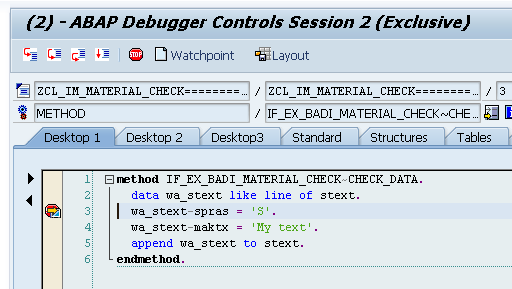
method IF_EX_BADI_MATERIAL_CHECK~CHECK_DATA.
  data wa_stext like line of stext.
  wa_stext-spras = 'S'.
  wa_stext-maktx = 'My text'.
  append wa_stext to stext.
endmethod.

9. Activate the changes and create a transport order if it is asked.

10. Finally, after the changes are made to the method, return and activate the BAdI. You must perform this action once, normally the first time. If you want to deactivate it click on the button at the right.

10. Set a breakpoint in the code inside the BAdI and create a material with transaction MM01. After you press the save button the debugger will pop up in the breakpoint you set. This was made intentionally to show how the BAdI will function.


Press F8 key to continue.

11. After the material is created go to transaction MM03 to visualize the material you recently created and then click on the 'Additional data' button.


13. Watch the results.


Of course, this is a simple example but other BAdIs involve to create dynpros and many other times there are no EXPORTING or RETURNING parameters and you must find other BAdIs or study a little more in order to achieve the task. I recommend to study the documentation and/or go to scn.sap.com forums. There are people who already done your solution.

WARNING: PLEASE, DO NOT PERFORM A COMMIT WORK, ROLLBACK OR RAISE ANY MESSAGE inside a BAdI. This action could lead to erroneous and inconsistent data in SAP because the BAdI instance is inside a LUW and committing/rolling back will perform changes in database without ending the process.

In the next article we'll implement a user-exit with transaction ' CMOD'.

See you in the next.

Hope it helps.

August 8, 2015

Find User-Exits and BAdIs in ABAP. Part 2

In the first post I gave a brief introduction of what are user-exits and BAdIs and what are for. This time I'm going to dive a little deeper on this issue.

As I wrote before when SAP is implemented in a company, it is often customized according to the business rules and procedures. This customizations consist in modifying the behaviour of transactions, change calculations, change screens and also adding or hiding data. SAP provides areas where the implementers can make this adjustments and prepare the system to work as the business requires.

I can tell only on my experience but as far as I'm concerned, SAP provides the best practices for the business, so, it is a great opportunity for the company to follow this work methodolgy. That is why SAP is very specialized tool and needs experienced functional users to manage this situations.

There are other configurations that can be made that are not necessarily user-exits or BAdIs, for example, it is possible to re-arrange screens and create code specifically address to a field or procedure. This configurations can be made through transaction 'OMT3B' in the case of material master data screen in the Retail version. This kind of configurations are beyond the scope of this post, however if you need more information you can go to SAP for more information.

One thing before I continue; in the big picture, every standard modification is known as user-exit, so to say, a screen-exit, BTE, VFOM and a BAdI all are considered as it.

Ok, once it is identified the transactions and programs to be enhanced it is necessary to look for those user-exits and/or BAdIs. So, how do we find them?

Well, there are some transactions and techniques that can help, I personally use three ways and it depends what I'm trying to do:

For the first option is necessary to identify the package of the programs using transaction 'SE93' or in the menu System / Status.

Transaction 'SE93' is used to create/modify/display transactions in SAP and provides among other information the name of the program and package it belongs, the same for the menu option.

1. Execute transaction 'SE93', type in transaction code the value 'MM01' and then click the button 'Display'.

2. Copy the package name.


3. Execute transaction 'SMOD'.

4. Click on text box 'Enhancement' and press key 'F4'.

5. Click button 'Information System' and then paste the package name in the text box 'Package'.


6. Finally press 'Enter' and it will appear the list of user-exits of that package.

To find BAdIs is a little more tricky because you need to debug the program or transaction. Follow the following instructions:

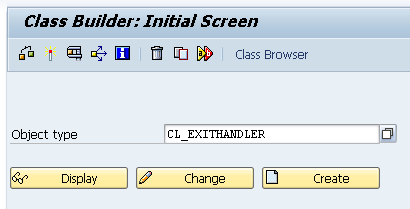
1. Execute transaction 'SE24'.

2. Type in the text box 'Object type' the class name 'CL_EXITHANDLER' and then click button 'Display'.


3. Double click the method 'GET_INSTANCE'.


4. Set a break point after 'get_class_name_by_interface'. The 'class_name' parameter is the value we are interested in.


5. Now, open another session and execute the transaction you want to be analyzed. If there's a BAdI then a debugging window will rise up in the breakpoint you set in the latter step.

6. Check the 'class name'. Then press F8 and when pauses in the same breakpoint then there it is another BAdI and then successively.

Fortunately you don't have to set the breakpoint in the 'CL_EXITHANDLER' at the beginning of a transaction, you can make it at any moment, for example, when clicking to save in a transaction.

Both techniques are good and practical however, there's an another even more practical way and is quicker than the other ones. There are several free abap code in the internet that you can use to find both user-exits and BAdIs.

You can find a very good one here. http://wiki.scn.sap.com/wiki/display/Snippets/Find+User-exits,+BADIs,+BTEs,+Etc+by+TCode+or+Program

As a side note, I know is faster to use the ABAP program however, it is necessary to learn to find these enhancements using the first two options because sometimes these programs can't see all these exits, so make your homework to be sure.

On the next post I'll show how to implement a user-exit.

Hope it helps.

August 2, 2015

Find User-Exits and BAdIs in ABAP. Part 1

In my beginnings with SAP I remember that I discovered these excellent features named 'user-exits' and 'BAdIs'. These concepts are very strong traits in SAP because they let you change the behaviour or the appearance of a program or transaction according to you necessity.

Most of the time when SAP is installed and implemented, usually the company customize some business areas, for example, the business requires to add an extra field to a screen, set a default value in a data, apply a new hierarchy of taxes, round a quantity and others, and all these enhancements are achieved through these 'doors', so to speak.

The user-exits and BAdIs focus on the same issue however they are implemented differently and all are set by SAP, in other words, SAP defines where this user-exits and BAdIs work in the system. The key here is to identify and apply them, so, if we want to modify the standard behaviour of some transaction, the path to follow is to find out if we can apply a user-exits or BAdIs.

A question to follow the latter is; what is the difference between those concepts if they do the same thing? Well, the answer is that BAdIs are the new way of applying user-exits and are more related to the object oriented design of the late version of SAP SAP R/3 a few years ago.

This doesn't mean that user-exits are deprecated, however in future upgrades of SAP we will see more BAdIs implemented specially on new transactions.

There are other ways to change SAP in order to make it behaves as we want, these are the 'enhancements' and 'modifications'. Enhancements are standard modifications at the top or bottom of a form where you can code and switch some values. These can be modified and deleted anytime.

The modifications consists in changing directly the standard code of SAP, but at this stage, you need to ask pemission to SAP communicating what are you going to change and then SAP will give an authorization code that will be registered in its logs, so, SAP will know that you are going to change the standard source code and also where are you making it. 

As you may imagine, these last ones should be the last resource to make because, depending on the transaction and unless you know exactly what are you doing, you are taking a big risk here. You are potentially exposing yourself to make a disaster on the implementation and if you do that, SAP will not take responsability on this issue. So, I would not recommend to follow this path to anyone unless, as I told you, you know exactly what you're doing.

For the latter maybe you could take the risk on reports which are inofenssive but you must be careful because your users could get a dump and that is not a good situation, especially if the transaction you enhanced is commonly used.

So, my best advice to you is try the standard solutions first and then, if you don't achieve what you want to do then I suggest to have a technical meeting with your coworkers and get a better approach to your requirement. 

On my experience I can tell that there is always a standard solution or at least there is SAP way  to achieve what you need to make and is very uncommon to make enhancements and yet less 'modifications', in fact, I evaluate very much the options that SAP gives me and then I proceed with it. The key here is to find the user-exit or BAdI that will tackle you necessity and how to code them.

One advantage of this is the knowledge you get. Basically you learn and get valuable experience on SAP and on the module you're working, and at the end this will benefit you a lot as an SAP professional. So, take my advice and make sure there's a standard way in SAP.

Well, this was only an introduction. On the next post I'll write more details and show how to implement user-exits and BAdIs and how to find them. So, see you on the next post.

Hope it helps.