April 10, 2015

Unlocking SM30 in ABAP

Hi, I'm going to show how to unlock transaction SM30 when using to admin data.

By default, SAP locks the entire table when a user edits a single entry which is annoying when several users try to use it.


To avoid this behaviour we must unlock the table to let others to add, update and delete data. 

Check this link for a more complete example.

Ok, let's code ABAP:

1. First of all create a table.

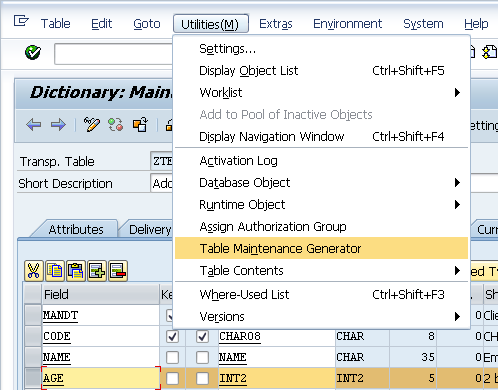
2. Goto Utilities/Table Maintenance Generator.

3. Set in Authorization Group the value '&NC&'.

4. In the 'Maintenance Screens' section select 'two step' and set as 'Overview screen' the value '100' and for 'Single screen' the value '101'.


5. Double click on screen '100'. You'll see a warning message but click on the ok button.


6. In PBO type 'MODULE unlock_table' like this:

1
2
3
4
5
6
7
process before output.
 module unlock_table. " ---------------------> Type this code
 module liste_initialisieren.
 loop at extract with control
  tctrl_ztesttab cursor nextline.
   module liste_show_liste.
 endloop.

7. Double click the word 'unlock_table' and add the following code. Send as a parameter your table name:

1
2
3
MODULE UNLOCK_TABLE OUTPUT.
  perform unlock using 'ZTESTTAB'. " Use your table name as parameter
ENDMODULE.

8. In the same include copy and paste the code for the form 'unlock_table':

 1
 2
 3
 4
 5
 6
 7
 8
 9
10
11
12
13
14
15
16
17
18
19
20
21
22
23
24
25
26
27
28
29
30
31
32
33
34
35
36
37
38
39
40
form unlock using p_table.
  data begin of seltab occurs 1.
        include structure vimsellist.
  data end of seltab.

  data begin of excl_cua_funct occurs 1.
        include structure vimexclfun.
  data end of excl_cua_funct.

  data: it_enq_del  type standard table of seqg3,
        it_enq_read type standard table of seqg7,
        wa_enq_read type seqg7,
        wa_enq_del  type seqg3,
        lv_subrc    type sy-subrc.

  call function 'ENQUE_READ2' " Buscar todos los bloqueos
   exporting
     gclient = sy-mandt
     gname   = ' '
     guname  = '*'
   tables
     enq = it_enq_read.

* Buscar el bloqueo de la tabla que viene como parĂ¡metro
  loop at it_enq_read into wa_enq_read
    where gname eq 'RSTABLE'
      and garg  cs p_table.
    move-corresponding wa_enq_read to wa_enq_del.
    append wa_enq_del to it_enq_del.
  endloop.

* Eliminar bloqueo del objeto
  call function 'ENQUE_DELETE'
    exporting
      check_upd_requests = 1
    importing
      subrc              = lv_subrc
    tables
      enq                = it_enq_del.
endform.

Well, that's it, now you can make modifications on the table in different sessions at the same time.

Next time we will lock a single record to avoid anyone else modify the same row when other user is handling it.

See you on the next.

Hope it helps.

March 25, 2015

Dynamic code generation in ABAP

Recently I discovered an excellent feature in ABAP which has helped me a lot in a requirement I had. This feature is the capacity to generate dynamic code and execute it in your program. As far as I know is possible to generate forms, classes and even programs.

My requirement needed to basically copy an SQL to create a special output. Following the DRY principle I didn't want to duplicate code. I wanted to use a parameter to change a portion of the SQL and get a dataset.

After some research I found this excellent feature which allows me to use a common procedure to manage any table and handle that data. 

Let's code an example:

 1
 2
 3
 4
 5
 6
 7
 8
 9
10
11
12
13
14
15
16
17
18
19
20
21
22
23
24
25
26
27
28
29
30
31
32
33
34
35
36
37
38
39
40
41
42
43
44
45
46
47
48
49
50
51
52
53
54
55
56
57
58
59
60
61
62
63
64
65
66
67
68
69
report  zdynamic.

tables mara.

data: gt_output type standard table of mara,
      wa_output like line of gt_output,
      gt_output2 type standard table of marc,
      wa_output2 like line of gt_output2.

select-options so_matnr for mara-matnr.

start-of-selection.

  write / 'MARA'. " Generate output for table 'MARA'
  perform create_dataset tables gt_output so_matnr using 'mara'.
  loop at gt_output into wa_output.
    write: / wa_output-matnr, wa_output-meins.
  endloop.

  write: /, /, 'MARC'. " Generate output for table 'MARC'
  perform create_dataset tables gt_output2 so_matnr using 'marc'.
  loop at gt_output2 into wa_output2.
    write: / wa_output2-matnr, wa_output2-maabc.
  endloop.

*&---------------------------------------------------------------------*
*&      Form  create_dataset
*&---------------------------------------------------------------------*
*       text
*----------------------------------------------------------------------*
*      -->P_OUTPUT   Result table
*      -->P_SELECT   Search parameter
*      -->P_TABLE    Table name
*----------------------------------------------------------------------*
form create_dataset tables p_output p_select using p_table type string.
  data: it_source type standard table of string with header line, " Structure that will hold the program to be generated
        lv_program type string, " The name of the program
        lv_error type string.  " The error in generation

  it_source = 'report create_dataset.'.
  append it_source.
  it_source = 'form execute tables p_output s_matnr.' .
  append it_source.
  it_source = 'select * from '.
  append it_source.
  it_source = p_table.
  append it_source.
  it_source = ' up to 10 rows into corresponding fields of '.
  append it_source.
  it_source = ' table p_output'.
  append it_source.
  it_source = 'where matnr in s_matnr.'.
  append it_source .
  it_source = 'endform.'.
  append it_source.

  generate subroutine pool it_source
           name lv_program
           message lv_error. " Generate the program. Here is where magic happens.

  if sy-subrc eq 0.
    write: / 'Program name:', lv_program.
    perform execute in program (lv_program) tables p_output p_select if found.
  else.
    write: / 'Error ocurred', lv_error.
    write sy-subrc.
  endif.
  write /.
endform.                    "create_dataset

The objective here is to read data from different tables. We will send a table name as a parameter to a form and generate ABAP code to execute it.

The form 'create_dataset' is the place where the generation happens. As we debug the code you can see that the internal table 'it_source' has the generated source code that is constructed using the parameter 'p_table'.


After that, the source code is compiled and a program is generated using the following statement:

1
2
3
generate subroutine pool it_source
         name lv_program
         message lv_error.

If everything works the following data is produced:

LV_PROGRAM = "%_T00O4R" (This name changes when generated)
LV_ERROR = Blank if compilation is succesful.


As I wanted to print different outputs with different data I just send the table name as the parameter and let SAP construct the subroutine for me.

What happens if the code is wrong and there are compilation errors? The answer is that nothing happens, there will be no dump, at least not at this stage. When an error happens in the code you will get the description of that exception in the 'message' parameter and SY-SUBRC will have the value '4' or '8'.

According to SAP documentation, SY-SUBRC will have one of the following values:

0 Generation was successful.
4 Source code contains a syntax error.
8 A generation error occurred.

The last part is check the value of SY-SUBRC and call the generated program, sending  the parameters as defined in the code.

1
perform execute in program (lv_program) tables p_output p_select using p_table if found.

Remember that the parameters must match with the form otherwise you'll get a dump.

The output of the program is the following:


In summary this great feature helped me a lot and the most important part of this is that it let me save code. Code that you don't write is code that you don't need to debug.

For better reference on this issue check this link.

See you in the next. Hope it helps.

March 20, 2015

Get reservations in ABAP

Once I needed to make a report to present material reservations and after checking some tables, finally I found a series of BAPIs that helped me in this requirement. You can check the results of the code in transaction 'MMBE' with any material.

Let's code the program.

 1
 2
 3
 4
 5
 6
 7
 8
 9
10
11
12
13
14
15
16
17
18
19
20
21
22
23
24
25
26
27
28
29
30
31
32
33
34
35
36
37
38
39
40
41
42
43
44
45
46
47
48
49
50
51
52
53
54
55
56
57
58
59
60
61
62
63
64
65
66
67
68
69
70
71
72
73
74
75
76
77
78
79
80
81
82
83
report  zreservation.

data wa_detail type bapi_mrp_stock_detail.

data: begin of xtab1 occurs 10,
         werks like resb-werks,
         lgort like resb-lgort,
         charg like resb-charg,
         matnr like resb-matnr,
         bdmng like resb-bdmng,
         bdmns like resb-bdmng,
         erfme like resb-erfme,
         erfmg like resb-erfmg,
       end of xtab1.

data: arbed like resb-bdart  value 'AR',
      mtres like resb-bdart  value 'MR'.

ranges: xbdart   for resb-bdart,
        ms_werks for marcv-werks.

parameters: p_matnr type marc-matnr obligatory,
            p_werks type marc-werks obligatory.

start-of-selection.

  CALL FUNCTION 'BAPI_MATERIAL_STOCK_REQ_LIST'
    EXPORTING
      MATERIAL                = p_matnr
      PLANT                   = p_werks
*     MRP_AREA                =
*     PLAN_SCENARIO           =
*     SELECTION_RULE          =
*     DISPLAY_FILTER          =
*     PERIOD_INDICATOR        =
*     GET_ITEM_DETAILS        =
*     GET_IND_LINES           = 'X'
*     GET_TOTAL_LINES         =
*     IGNORE_BUFFER           =
*     MATERIAL_EVG            =
    IMPORTING
*     MRP_LIST                =
*     MRP_CONTROL_PARAM       =
      MRP_STOCK_DETAIL        = wa_detail
*     RETURN                  =
*   TABLES
*     MRP_ITEMS               =
*     MRP_IND_LINES           =
*     MRP_TOTAL_LINES         =
*     EXTENSIONOUT            =
            .

  refresh xbdart.
  clear   xbdart.
  xbdart-sign   = 'I'.
  xbdart-option = 'EQ'.
  xbdart-low    = arbed.
  append xbdart.
  xbdart-low    = mtres.
  append xbdart.

  refresh ms_werks.
  clear   ms_werks.
  ms_werks-sign   = 'I'.
  ms_werks-option = 'EQ'.
  ms_werks-low    = p_werks.
  append ms_werks.

  CALL FUNCTION 'MB_ADD_RESERVATION_QUANTITIES'
    EXPORTING
      X_KZEAR       = space
      X_MATNR       = p_matnr
      X_XLOEK       = space
*     X_KZWSO       = ' '
    TABLES
      XBDART        = xbdart
      XTAB1         = xtab1
      XWERKS        = ms_werks.

  write: 'Material:', p_matnr, 'Reservations:', wa_detail-reservations, /.
  loop at xtab1.
    write: 'Storage Location:', xtab1-lgort, 'Reservations:', xtab1-bdmng, /.
  endloop.

See you in the next post.

Hope it helps

March 6, 2015

Table maintenance and other features

In the previous post I showed how to make use of some of the features that SAP provides when making tables.

We made a table, we generated a table maintenance screen, we selected events and put come code there to show how events work. This time I would like to show another feature that we could use when we program events.

Ok, let's code;

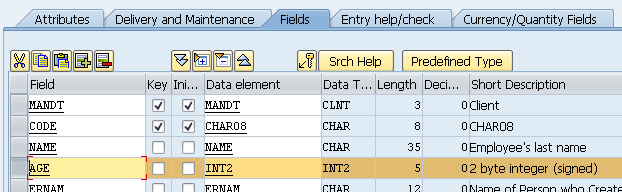
First of all, let’s add another field and call it 'AGE' with the data element 'INT2'. Check the screen.


2. Activate the table

3. Update the dynpro to include the new field.
4. Go to Utilities / Table Maintenance Generator menu.


5. Go to Environment / Modification / Events menu. Click 'Ok' on the message box.


6. Add a new entry, select option '01' (Before saving the data in the database) and type 'ON_BEFORE_SAVE'

7. Click on the editor button.


8. Select the include previously created or create a new one. I'll use the one that exists.


9. Enter the following code.

 1
 2
 3
 4
 5
 6
 7
 8
 9
10
11
12
13
14
15
16
form on_before_save.
  data wa_testtab type ztesttab.

  loop at total. " Check all the records
    if <vim_total_struc> is assigned.
      move-corresponding <vim_total_struc> to wa_testtab. " Get the line to check
    endif.

    if <action> ne 'D' and <action> ne 'X'. " Consider only create and update operations
      if wa_testtab-age not between 15 and 130.
        message 'Age is not valid. Must be between 1 and 130' type 'I' display like 'E'.
        vim_abort_saving = 'X'. " Abort operation
      endif.
    endif.
  endloop.
endform.

The variable 'total' is a table with header line which contains all the data of the table. 

The field symbol '<vim_total_struc>' is a structure that contains the line or tuple we are reading. Remember that at this point we haven't saved but we get the changes we've made to the record. Here we transfer the data from the field symbol to the work area of type 'WA_TESTTAB'.

The field symbol '<action>' indicates the action over the record. It can be 'I' (insert), 'U' (update), 'D' (delete) or 'X' (none). In this example we are going to validate when inserting or updating data.

The variable 'vim_abort_saving' is used to indicate if we cancel the operation. If the age is not between 15 and 130 we'll issue an error and SAP will not save the new entries or changes.

10. Activate the code.


11. Return and save.


12. Create a new entry without age and then try to save. The error 'Age is not valid. Must be between 15 and 130' will arise. No matter what you do, unless you type a valid age the data won't be saved. 


As you can see, you can make use of this feature to add more validations or manage your data in your table. 

Well, that's it for now. Hope it helps.

February 27, 2015

Table Maintenance options and ABAP

One of the traits I like about SAP is that you have several facilities to achieve more. One of those characteristics is in transaction ‘SE11’. This transaction is used to create tables and it comes with a feature where you can generate it’s own screen (dynpro) and basic validations, like, unique index and others.

This screen(s) can be modified with our own logic and validations and even the layout. You can add more detail as you wish. Maybe you could make this maintenance screen making a module pool in SE80 however the point here is that with transaction ‘SE11’ you don’t start from zero. This trait is very important because you can have a lot of features incorporated.

Let’s begin creating a table.

1. Execute transaction ‘SE11’ and name the table whatever you want but remember to use ‘Z’ or ‘Y’ as first letter.

2. Click on ‘Create’ button.

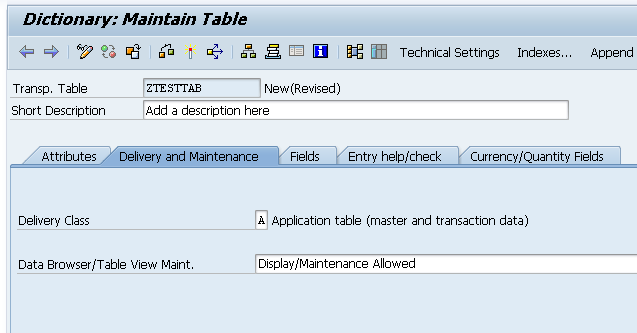
3. Add a description to table (This step is mandatory). Choose ‘A’ option for 'Delivery class' and ‘Display/Maintenance allowed‘ on the 'Delivery and maintenance’ tab. Check image.


4. Select ‘Fields’ tab
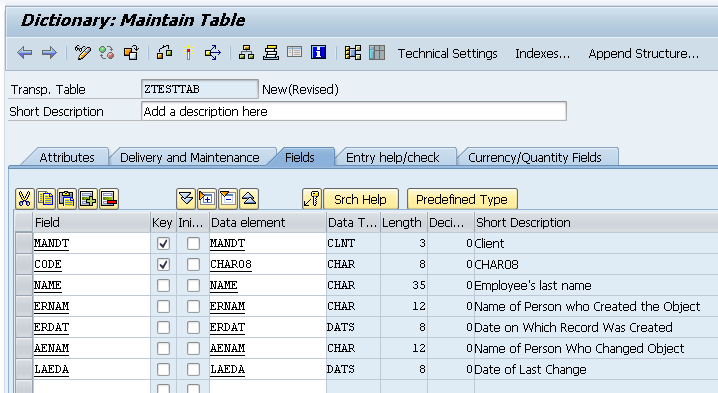
  1. Add the following fields:
    1. Add as a first field ‘MANDT’ with type ‘MANDT’.
    2. Add field ‘CODE’ type CHAR08.
    3. Add field ‘NAME’ type STRING.
    4. Add field ERNAM type ERNAM
    5. Add field ‘ERDAT’ type ‘ERDAT’
    6. Add field ‘AENAM’ type ‘AENAM’
    7. Add field ‘LAEDA’ type ‘LAEDA’.


5. Setup the ‘Technical Settings’ where you will set 'Data class' will be 'APP0L' and 'Size Category '0'. Also check 'Log data changes' and 'Write access only with JAVA', these 2 options are optional. Here you'll be asked to save and a package before this screen, I suggest to click on 'Local object' button.


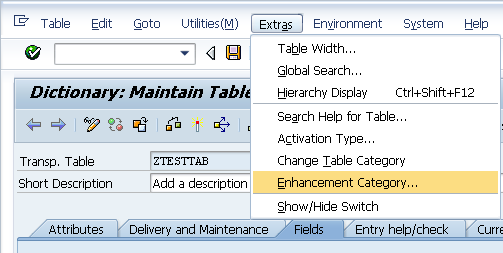
6. Choose the 'Enhancement Category' in Extras menu. Select 'Can be enhanced (character-type or numeric)' option.


7. Activate.


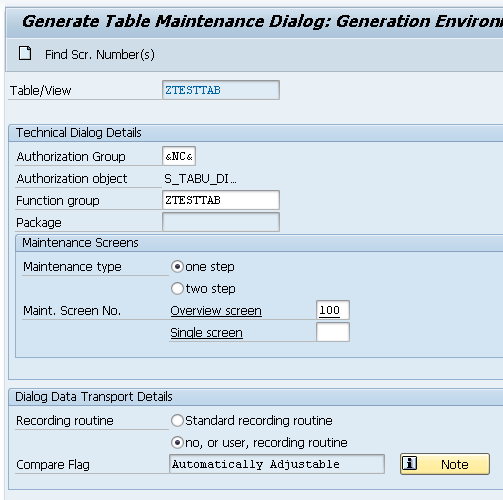
The next thing we should do is to generate the maintenance screen. The option we need here is in ‘Utilities’ menu where you select the ‘Table Maintenance Generator’ option. Here we have some things to configure;


First you need to indicate the authorization group, here it depends on what kind of restriction you would like this program to make, for this example type ‘&NC&’ which means ‘w/o auth. group’. The second thing to set is the function group, personally I would recommend to use the table name, however is up to you which name you set here.


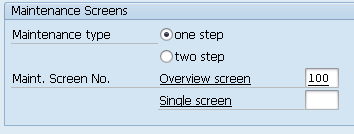
The third thing would be to set the screens of the block ‘Maintenance screens’. In this section you have two options:
  • One step
  • Two step
And the difference is that in the first option you make inserts and modifications in only one dynpro, here SAP sets you a grid to make all the actions on your data. The second option consists in specifying 2 dynpros; one for the grid and the second for issuing the data. The first dynpro shows you the data but in order to make inserts or changes you must make a double click to show you the data.

In our example select the first option (One step) and type '100' in the ‘Overview screen’.


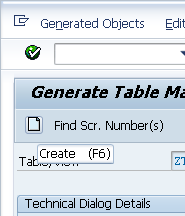
Now, click on 'Create' button or press 'F6'.


The next step is to make use of events. This option is found in the menu ‘Environment’/’Events’.


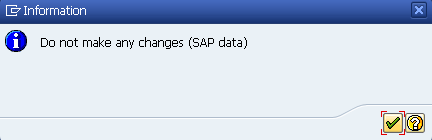
If you get the following message box click the 'Ok' button.


You will get through the following screen where you must choose what events are going to be raised.

01 Before saving the data in the database
02 After saving the data in the database
03 Before deleting the data displayed
04 After deleting the data displayed
05 Creating a new entry
06 After completely performing the function 'Get original'
07 Before correcting the contents of a selected field
08 After correcting the contents of a selected field
09 After getting the original of an entry
10 After creating the header entries for the change task (E071)
11 After changing a key entry for the change task (E071K)
12 After changing the key entries for the change task (E071K)
13 Exit editing (exit main function module)
14 After lock/unlock in the main function module
15 Before retrieving deleted entries
16 After retrieving deleted entries
17 Do not use. Before print: Event 26
18 After checking whether the data has changed
19 After initializing global variables, field symbols, etc.
20 after input in date subscreen (time-dep. tab./views)
21 Fill hidden fields
22 Go to long text maintenance for other languages
23 Before calling address maintenence screen
24 After restricting an entry (time-dep. tab./views)
25 Individual authorization checks
26 Before creating a list
27 After creation or copying a GUID (not a key field)
28 After entering a date restriction for time-dep. views
AA Instead of the standard data read routine
AB Instead of the standard database change routine
AC Instead of the standard 'Get original' routine
AD Instead of the standard RO field read routine
AE Instead of standard positioning coding
AF Instead of reading texts in other languages

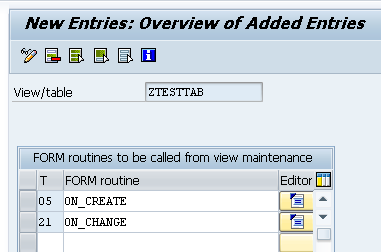
Just for example let’s use the events ‘05’ (Creating new entry) and ‘21’ (Fill hidden fields). Let’s say we want to put the user name and the date when the record is created and modified it.

  1. Type event ‘05’ and on the ‘FORM Routine’ column type ‘on_create’.
  2. Type event ‘21’ and on the ‘FORM Routine’ column type ‘on_change’.


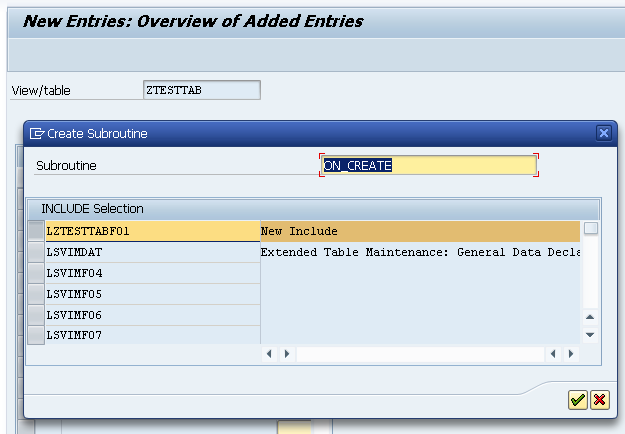
3. Next, click on column editor the button to type the code. You’ll be asked to make a PAI include. Click on button ‘OK’.


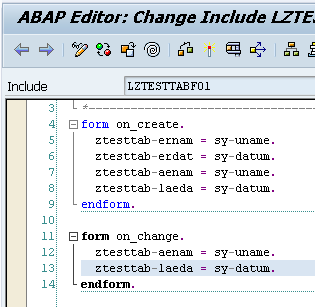
4. Paste the following code.


 1
 2
 3
 4
 5
 6
 7
 8
 9
10
11
form on_create.
  ztesttab-ernam = sy-uname.
  ztesttab-erdat = sy-datum.
  ztesttab-aenam = sy-uname.
  ztesttab-laeda = sy-datum.
endform.

form on_change.
  ztesttab-aenam = sy-uname.
  ztesttab-laeda = sy-datum.
endform.

5. Return to the event entries screen and click the save button and go back to the ‘Table Maintenance’ screen and also save the configuration.

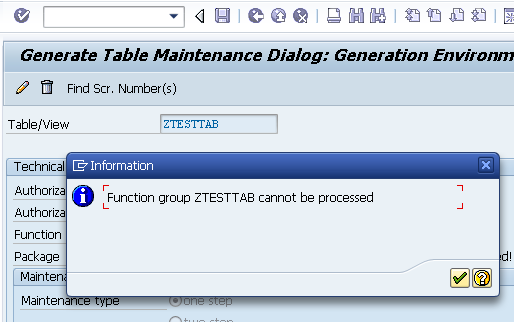
If you have the following message box ‘Function group ZTESTTAB cannot be processed’ then go to transaction ‘SE80’ and select the function group ‘ZTESTTAB’ and activate it but first change the ‘Change’ state of the table to ‘Display’. Check the images below.


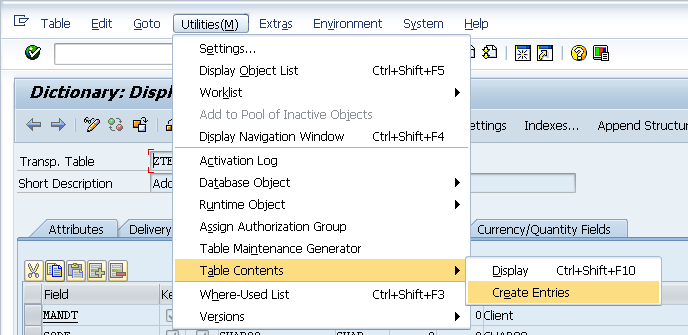
6. Create entries. Go to 'Utilities'/'Table contents'/'Create Entries' menu.


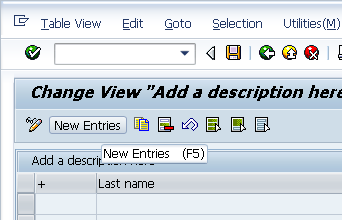
7. Finally click on button ‘New Entries’, fill the fields ‘+’ and ‘Last Name’ and press enter. And you’ll see that fields ‘Created by’, ‘Created On’, ‘Changed by’ and ‘Changed on’ now have the values we set in the ‘Creating a new entry’ event. The same will occur when you change it with another user.


One last comment is that in order to protect those fields from being modified you must edit the dynpro '100' you set in the 'Utilities'/'Table Maintenance Generator' menu and set the ‘Input‘ column to ‘Not possible’ value in the ‘Special Attributes’ tab on the columns ‘ERNAM’, ‘ERDAT’, ‘AENAM’ and ‘LAEDA’.


Hope it helps. See you on the next.